Module 1: Forward Kinematics
This module will derive the forward kinematics for the UR5e robot in two different ways, as a product of Lie groups (Part A) and as a product of exponentials (Part B). The visualization will be used to verify that your calculation is correct.
Complete setting up first.
The module will walk you through creating your own code base. I recommend setting up the structure of your code as follows:
ur5e/
  ur5e_model/       UR5e model, from setting up
    scene.xml
    ur5e.xml        link offsets and joint axes
    assets/         meshes
  transforms.py     helper functions (copy as-is)
  kinematics.py     your forward kinematics (fill in the TODOs)
  module1.py        runs the simulation (copy as-is)
The model file
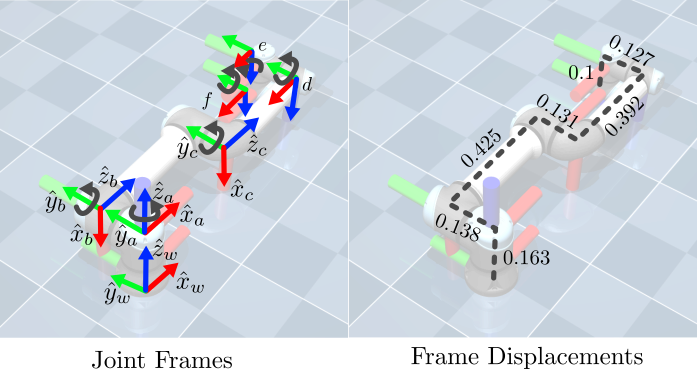
After completing the setting up module linked above, you should have a folder with the UR5e model listed in ur5e/ur5e_model/. This model contains an xml file (ur5e_model/ur5e.xml) that describes the rigid-body-tree of the robot. This file contains the frame offsets and axes with:
posbeing the displacement \( d_i \) of the body in the parent framequatbeing the quaternion representation of the orientation of the body in the parent frameaxisdefining the joint axis in the parent frame. Note that joints without anaxisuse the defaultaxis="0 1 0".
A snipped of the xml would look like the following:
<body name="shoulder_link" pos="0 0 0.163">
  <joint name="shoulder_pan_joint" class="size3" axis="0 0 1"/>
  ...
  <body name="upper_arm_link" pos="0 0.138 0" quat="1 0 1 0">
    <joint name="shoulder_lift_joint" class="size3"/>
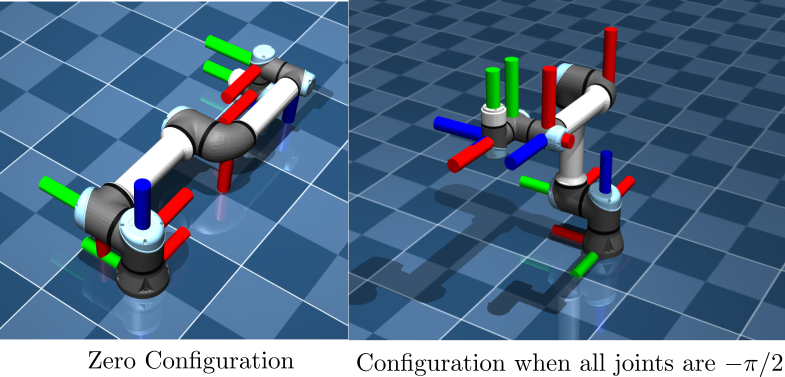
All variables/values needed for the forward kinematics can be derived from this xml, but for conveninece I will also provide a graphical illustration of the frames below:
Skeleton Code
To set up the structure of the code, copy these two files into your folder as the helper functions transforms.py and the forward-kinematics functions kinematics.py.
transforms.py(helper functions, no changes needed):
import numpy as np


def rot_x(theta):
    c, s = np.cos(theta), np.sin(theta)
    return np.array([[1, 0, 0], [0, c, -s], [0, s, c]])


def rot_y(theta):
    c, s = np.cos(theta), np.sin(theta)
    return np.array([[c, 0, s], [0, 1, 0], [-s, 0, c]])


def rot_z(theta):
    c, s = np.cos(theta), np.sin(theta)
    return np.array([[c, -s, 0], [s, c, 0], [0, 0, 1]])


def homogeneous(R, p):
    """4x4 homogeneous transformation from R (3x3) and p (3,)."""
    g = np.eye(4)
    g[:3, :3] = R
    g[:3, 3] = p
    return g


def skew(w):
    """3x3 skew-symmetric matrix of w."""
    return np.array([[0, -w[2], w[1]], [w[2], 0, -w[0]], [-w[1], w[0], 0]])


def twist_matrix(xi):
    """4x4 twist matrix of xi = [v; omega]."""
    xi_hat = np.zeros((4, 4))
    xi_hat[:3, :3] = skew(xi[3:])
    xi_hat[:3, 3] = xi[:3]
    return xi_hat


def revolute_twist(omega, q):
    """Twist [v; omega] of a revolute joint with axis omega through point q."""
    return np.concatenate([-np.cross(omega, q), omega])
kinematics.py(your job will be to fill in the parts markedTODO):
import numpy as np
from scipy.linalg import expm
from transforms import rot_x, rot_y, rot_z, homogeneous, twist_matrix, revolute_twist


# Part A: product of Lie groups
def forward_kinematics_homogeneous(theta):
    theta1, theta2, theta3, theta4, theta5, theta6 = theta

    # TODO: the rotation of each frame relative to the previous one
    R1 = np.eye(3)
    R2 = np.eye(3)
    R3 = np.eye(3)
    R4 = np.eye(3)
    R5 = np.eye(3)
    R6 = np.eye(3)

    # TODO: the displacement to each frame, in the coordinates of the previous frame
    d1 = np.array([0.0, 0.0, 0.0])
    d2 = np.array([0.0, 0.0, 0.0])
    d3 = np.array([0.0, 0.0, 0.0])
    d4 = np.array([0.0, 0.0, 0.0])
    d5 = np.array([0.0, 0.0, 0.0])
    d6 = np.array([0.0, 0.0, 0.0])

    return (homogeneous(R1, d1) @ homogeneous(R2, d2) @ homogeneous(R3, d3)
            @ homogeneous(R4, d4) @ homogeneous(R5, d5) @ homogeneous(R6, d6))


# Part B: product of exponentials
def joint_twists():
    # TODO: the axis of each joint, in world coordinates at the zero configuration
    omegas = [np.array([0.0, 0.0, 0.0]) for _ in range(6)]

    # TODO: a point on each axis, in world coordinates at the zero configuration
    points = [np.array([0.0, 0.0, 0.0]) for _ in range(6)]

    return [revolute_twist(w, q) for w, q in zip(omegas, points)]
def forward_kinematics_exponential(theta):
    g = np.eye(4)
    for xi, theta_i in zip(joint_twists(), theta):
        g = g @ expm(twist_matrix(xi) * theta_i)

    # TODO: reference configuration
    R0 = np.eye(3)
    p0 = np.array([0.0, 0.0, 0.0])
    reference_configuration = homogeneous(R0, p0)

    return g @ reference_configuration
Completing the Forward Kinematics
The main task of this module is to compute the forward kinematics using both methods that we have learned in class. Do this by completing the “To Do” items in the functions forward_kinematics_homogeneous, forward_kinematics_exponential (and joint_twists which is used in forward_kinematics_exponential).
Running/Testing your Code
To run and evaluate your forward kinematics, create a module named module1.py with the following content:
import time
import mujoco
import mujoco.viewer
import numpy as np
from kinematics import forward_kinematics_homogeneous, forward_kinematics_exponential

m = mujoco.MjModel.from_xml_path("ur5e_model/scene.xml")
d = mujoco.MjData(m)

# Random joint configuration (comment out the seed to try others)
np.random.seed(1)
q_des = np.random.uniform([-np.pi/2, -np.pi, -np.pi/2, -np.pi/2, -np.pi/2, -np.pi/2],
                          [ np.pi/2,  0,      np.pi/2,  np.pi/2,  np.pi/2,  np.pi/2])
d.qpos[:6] = q_des

# PD gains for holding the arm at q_des
Kp = np.array([200, 200, 200, 100, 100, 100])
Kd = np.array([10, 10, 10, 10, 10, 10])

# Rotates a cylinder so its axis lies along the frame's y-axis
cylinder_to_y = np.array([[1, 0, 0], [0, 0, 1], [0, -1, 0]])

with mujoco.viewer.launch_passive(m, d) as viewer:
    while viewer.is_running():
        step_start = time.time()

        # Your forward kinematics
        g_lie = forward_kinematics_homogeneous(d.qpos[:6])
        g_exp = forward_kinematics_exponential(d.qpos[:6])

        # Blue disc: Part A. Larger see-through green disc: Part B.
        viewer.user_scn.ngeom = 2
        mujoco.mjv_initGeom(viewer.user_scn.geoms[0], type=mujoco.mjtGeom.mjGEOM_CYLINDER,
                            size=[0.05, 0.075, 0], pos=g_lie[:3, 3],
                            mat=(g_lie[:3, :3] @ cylinder_to_y).flatten(), rgba=[0, 0, 1, 1])
        mujoco.mjv_initGeom(viewer.user_scn.geoms[1], type=mujoco.mjtGeom.mjGEOM_CYLINDER,
                            size=[0.08, 0.05, 0], pos=g_exp[:3, 3],
                            mat=(g_exp[:3, :3] @ cylinder_to_y).flatten(), rgba=[0, 1, 0, 0.25])

        # PD control
        d.ctrl[:] = Kp * (q_des - d.qpos[:6]) - Kd * d.qvel[:6]
        mujoco.mj_step(m, d)
        viewer.sync()
        time.sleep(max(0, m.opt.timestep - (time.time() - step_start)))
Then run it from your folder:
python module1.py
macOS: use
mjpythoninstead ofpythonto run any script that opens the viewer, e.g.mjpython module1.py.
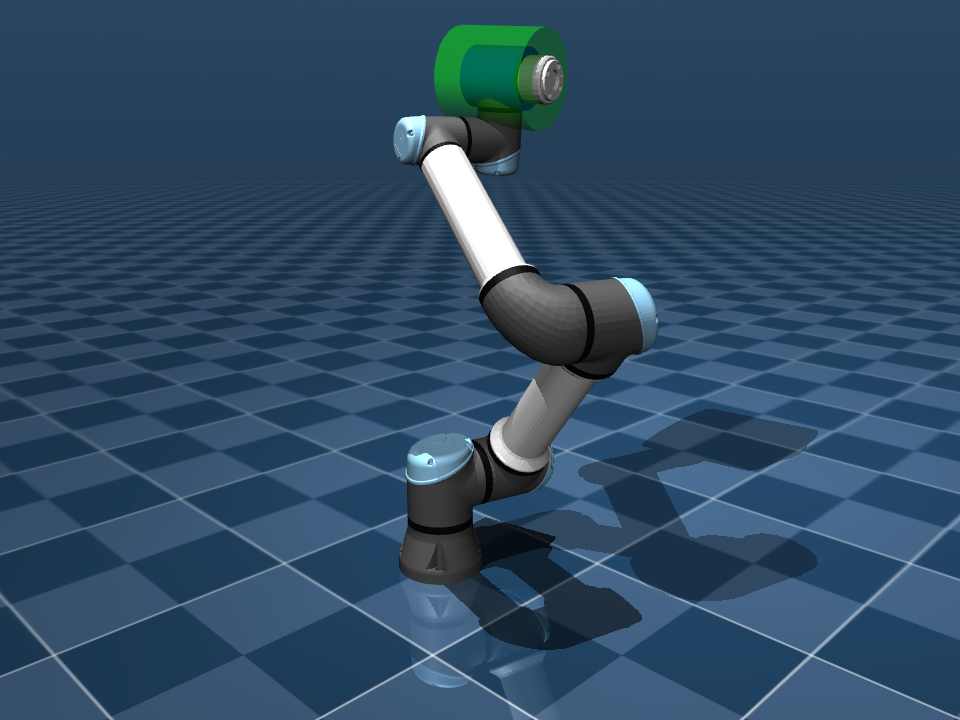
You should see the arm move to a random configuration, with the blue disc and the larger green disc co-located at the end-effector. The pose of blue disc is determined from Part A and the pose of the green disc is determined from Part B. If both are correct, they will look like the following:
What to submit
- A frame diagram of the UR5e with each frame and displacement labeled.
- Your \( R_i \) and \( d_i \), with where each came from.
- Your \( g(0) \), \( \omega_i \), and \( q_i \).
- A screenshot of the viewer showing the two discs lined up.
- One or two sentences comparing the two methods.